
Aquatic Plant Management Permit FAQs
Below are some commonly asked questions about aquatic plant management. If you still have questions about aquatic plant management or the permit process, please feel free to contact the program by emailing DNRAPMProgram@wisconsin.gov.
- General Information
- ePermitting System - General Questions
- ePermitting System - Permit Form Questions
- ePermitting System - Reporting Form Questions
- ePermitting System - Troubleshooting
- Permit Issuance (Timeline, Holds, Etc.)
- Permit Files
- Permit Changes and Waterbody Status Changes
- Permit Refunds
General Information
When is an APM permit required for vegetation control in streams, lakes and ponds?
Controlling plants in waters of the state is regulated under NR107 (Chemical Management) and NR109 (Mechanical/Manual Management). If it is wet, under s. 281.201 (18) Wis. Stats., it is a water of the state. An Aquatic Plant Management (APM) permit is always required for chemical control in a water of the state. If you wish to treat a streambank adjacent to a water of the state that is not a wetland and there is a potential for pesticide drift, you should apply for an APM permit. The APM Permit Application page has information to get you started, including a guidebook for submitting a permit application.
If you are conducting mechanical control on a waterbody 10 acres or less in size on the land of one person, that may be done without a permit. If the waterbody is over 10 acres, or more than one person has access to the waterbody, then a Mechanical APM permit is needed.
When is an APM permit required for vegetation control in wetlands?
An APM permit is always required for chemical control in wetlands that meet the wet sock test. Wetlands are areas where water is at, near or above the land surface long enough to be capable of supporting aquatic or hydrophytic vegetation. Soils will be indicative of wet conditions as well.
Wet sock rule is used to determine if the soil is saturated with water even when there is no visible standing water. Instead of requiring a battery of physical tests on the soil to determine this, the sock rule was devised for a quick and dirty (no pun intended) field test. If you walk on a site with socks on your feet and they get wet, you should assume the soil is saturated and ponded water may be present; therefore, the site contains waters of the state and requires an NR107 permit before pesticides can be applied.
If the area you are controlling is in an ephemeral wetland and you will not be controlling during saturation times, a permit is unnecessary. If you are unsure whether the area will be wet or not when you control, we recommend you get a permit in advance so that your work is not delayed. If you are doing mechanical removal of cattails, phragmites, buckthorn or other vegetation in a wetland, and the area is over 10 acres or not on private land, a permit is needed. If the area is less than 10 acres on private land, no permit is needed for mechanical removal.
If you have questions about your area, check in with your regional APM Coordinator before you get started working.
How can I determine which kind of APM permit I need?
The Aquatic Plant Management (APM) Permit Application Form has a questionnaire widget towards the bottom of the page to help you determine what permit you need and how to obtain it.
Can I remove vegetation from my shoreline or around my pier?
If wild rice or state/federally listed endangered species are present, or the location is within a Sensitive Area, you may not remove any vegetation without a permit from the DNR. If you are unsure if any of these species are present, please contact your regional APM Coordinator.
If no protected species are present, removal of vegetation on exposed lakebed areas (below the OHWM) is limited to a single 30-footwide path measured along the shoreline per property. This area must be adjacent to or within an area with a pier, boathouse, swim raft and other recreational devices. All vegetation may be removed in this 30-foot-wide path. You can remove it by hand without any DNR approvals. This means that you can hand pull it, use a string trimmer (weed whacker) or use a push lawn mower.
The cut material must be removed and disposed of in an upland location. When removing exotic species such as Phragmites, purple loosestrife or Eurasian watermilfoil, it is important to dispose of it so it does not spread to other areas. One way to do this is to bag up the cut material, mark the bags with
Invasive plant species approved by Wisconsin DNR for landfilling
and send them to a landfill (you will need to check with your local landfill first to determine if they will accept the material).Here are some documents that outline what can and cannot be done offshore of your property in the water:
Can I apply pesticides off my dock or to my own pond?
Regardless of who does the work, you will need a permit from the DNR prior to applying any chemicals in a wetland, lake, stream or pond.
However, homeowners cannot apply pesticides to lakes, rivers, streams or wetlands without a DATCP certification in Aquatics and Mosquitos Category 5 in almost all situations. Generally, the DNR recommends individuals hire a commercial applicator to apply pesticides to a lake, stream or river.
There are two exceptions to this rule:
- If you are a homeowner who wishes to apply herbicides in an area less than 0.25 acres with a granular herbicide that is not a Restricted Use product, you may do the work yourself after receiving an APM permit.
- If you own a pond that is entirely on your land with no discharge, you may do the work yourself after receiving an APM permit. You will need to follow all the instructions on the pesticide label exactly; failure to follow the label is a violation of federal law.
Do I need a DNR permit to do work on my own pond?
Yes, you need an APM permit to use any pesticidal products and for some non-pesticidal products. If your pond connects to other waters off of your property and you are applying pesticides, you will need a Wastewater permit. If your pond is entirely on your property and it does not have a discharge point, you may apply non-pesticidal products (muck pellets) to your pond without a permit.
You can apply pesticides yourself with a permit in some cases, but in other situations you will need to hire a professional. If the pond has public access or connects to other waters off of your property, or if other homeowners live around the pond, then you cannot apply pesticides yourself. You must hire a DATCP-certified chemical applicator to do the work. If your pond connects to other waters via a culvert, stream, etc., then you need a Wastewater permit as well.
Manual removal or use of mechanical devices to control or remove aquatic plants from a body of water 10 acres or less that is entirely confined on the property of one person with the permission of that property owner is also waived from permitting requirements (NR.109.06(1)).
The Aquatic Plant Management (APM) Permit Application page has more information about APM permits to get you started, including a guidebook for submitting a permit application.
The Wastewater General Permits page has more information about that program’s permitting requirements.
If you have more detailed questions on wastewater permits, please contact DNRWYWastewaterGeneralPermits@Wisconsin.gov.
If you have more detailed questions on APM permits, please contact DNRAPMProgram@wisconsin.gov.
Can I use an herbicide in my drainage ditch or Right of Way?
There is an exemption under the administrative code NR 107.11(4)(e) for treatment of emergent vegetation in drainage ditches or rights-of-way where the department determines that fish and wildlife resources are insignificant. If you believe your situation fits that exemption, please reach out to your local APM Coordinator for the county in which the ditch/ROW resides using the APM Coordinator map on the APM page so they can evaluate if the exemption applies. It would be helpful to provide a map showing the exact location of the intended plant removal and to let them know the specific product (trade name and EPA#) that you want to use.
If the exemption does not apply, you will need to submit an NR107 permit application. APM permit applications are completed online using the ePermitting system. The ePermitting Guidebook provides the full instructions for filling out APM permits, including how to access the system and submit an application. Please note the guidebook's
Quick Guide Outline
section since you may need to create a MyWisconsin ID unless you are logging in under an existing account.What pesticides do you recommend for aquatic safe applications?
The DNR does not make specific product recommendations. However, we do have comprehensive information on the active ingredients allowed for use in Wisconsin, including their general uses, risks and safety requirements. DNR, DATCP and DHS also update general information about pesticide usage in water for your information. To learn about the different types of pesticides allowed for aquatic use in Wisconsin and for general information about pesticides in water, visit the Fact Sheets page.
The DATCP Pesticide Database page allows you to search for specific products. It shows where they are allowed for use, the pests they control and the product label. If you would like to see the full list of options available for controlling a particular species with a particular active ingredient, you can use the Multiple Criteria search. For example, if you enter
Cattail
as the pest andGlyphosate, isopropylamine salt,
you can see the full product list of what is registered for use in the state under that same active ingredient.Can I use muck pellets or some other kind of product on my lakeshore area?
You cannot apply any products to your lakeshore area without approval from DNR. If you would like to apply a pesticidal product, check in with your local APM coordinator to confirm what regulations apply to you. If you would like to apply a non-pesticidal product such as a muck pellet, you will need to check with Wastewater program prior to doing any work.
For questions on the low impact GP, please email DNRWYWastewaterGeneralPermits@Wisconsin.gov
Can I use a muck pellet or other additive product that is not in the previously reviewed list?
Information about muck pellets can be found on the Wastewater program's Additive page. Since that product is not on the list of previously reviewed additives, the product manufacturer would need to submit information to the Department so an additive review can be performed (more information at the link provided). A Wastewater permit is also likely to be required since the activity is being proposed on a lake. If the product makes pesticidal claims (suppresses algae, reduces swimmer’s itch, etc.) in addition to claims about reducing/digesting ‘muck,’ the product may fall under the legal definition of a ‘pesticide’ and would therefore require EPA registration as a pesticide or pesticidal device. Without that registration, the DNR would not allow the use of this specific product as marketed.
Can I use a
Nanobubble
product on my waterbody?Nanobubble technology for use in lake restoration is considered an emerging area of research. Most studies of nanobubbles thus far have only demonstrated their potential using short-term, small-scale studies conducted mainly in laboratory and aquaculture settings.
Nanobubble equipment is marketed to control cyanobacteria, harden and compact bottom sediments, and provide other water quality benefits. However, there is limited to no peer-reviewed or published scientific literature which support these claims, or which describe the effects of nanobubble equipment on green algae, zooplankton, phytoplankton or water quality.
Additional research is needed to demonstrate the potential impacts of this technology in lake systems. In addition to understanding target and non-target impacts to aquatic ecosystems, the department also needs research-based evidence from lake systems that documents the efficacy and longevity of nanobubble technology in overall lake restoration.
Due to the lack of information to show the efficacy or non-target effects nanobubble equipment, the department has limited pathways to permit this novel equipment. The department will review any proposals on a case-by-case basis considering the scale of implementation, waterbody characteristics and the nature of the equipment. Please reach out to Michelle Nault (michelle.nault@wisconsin.gov) with any specific questions you have.
Can I use an Aquathruster product on my waterbody?
Information about Aquathrusters can be found on the Waterway and Wetland program's Mechanized Aquatic Plant Management page under
mixing prop or other mixing devices.
From this link:
Although the department does not advocate for mixing props, a permit is not required to install or maintain these devices so long as the following conditions are met:
- the prop is attached to a legal structure that has either received a permit or is exempt from needing a permit;
- the mixing action does not disturb the lake bottom and the discharge jet is below the water surface; and
- the prop does not cause problems for lake users or neighbors.
If any of the above conditions are not met, visit water permits to apply for a miscellaneous structure individual permit.
You can contact your regional APM Coordinator (the APM Coordinator map on the APM page lists contact information for each staff) with any further questions about your specific lake.
Can I use a Neptune rake on my waterbody?
To the department’s knowledge, the Neptune rake has not been used in Wisconsin to date. A Neptune rake, or any similar equipment that is simultaneously dredging and removing aquatic plants and organisms, would require an aquatic plant management permit as well as a waterways and wetlands permit.
As the Neptune rake is used, it is unlikely that the equipment would be permittable under the Aquatic Plant Management rules (NR 109) in most situations.
If you have questions about the Waterways and Wetlands permits for this equipment, you may reach out to Crystal Von Holdt.
Beyond the Neptune rake, there are other options to consider:
- The Aquatic Plant Management Information, Tools and Research pages have a lot of information on different control options, including chemical, mechanical and manual removal.
- The APM Strategic Analysis document talks in greater detail about the pros and cons of different management approaches. Use the links in the table of contents to help navigate the document.
ePermitting System - General Questions
I want to apply for an APM permit. What is the general process?
APM permit applications are completed online using the ePermitting system. The ePermitting Guidebook provides the full instructions for filling out APM permits, including how to access the system and submit an application. Please note the guidebook's “Quick Guide Outline" section since you may need to create a MyWisconsin ID unless you are logging in under an existing account. The guide walks you through the entire process and outlines what materials are required.
Refer to the ePermitting site for submitting APM permits (MyWisconsin ID required to log in).
There is also the Lakes, Rivers, Non-private ponds checklist you can use to make sure you completed all the requirements correctly.
If you have further questions, we suggest you reach out to your local APM Coordinator for the county where the waterbody resides. It may be helpful for you to provide specific details about where you wish to control plants, such as the address of the property and a diagram of the area so they can take a look.
If you have questions about the online permitting process, please email them to DNRAPMProgram@wisconsin.gov.
I started an application on the ePermitting system. How do I get back in and finish it?
You can access your draft again by doing the following:
- Log back in to the ePermitting site using your MyWisconsin ID.
- Under Step 1 Draft Items, you should see your application under your draft number and project name. The format looks like:
AIXXXX-ExampleName.
Click on that name. - Continue filling out the fields. You will need to complete all the tabs, pay and then sign and submit. Our ePermitting guidebook can help walk you through this entire process.
Can you delete my draft from the ePermitting system?
APM Staff do not have permissions to delete draft items. Drafts are automatically deleted from the system after 150 days. If you would like an item deleted sooner than that, you can submit a help request to our IT Staff. Please include the specific draft number and name of the items you want deleted. The draft number format looks like “AIXXXX-ExampleName.”
Can I submit paper permit documents instead of using the online system?
No, we cannot accept paper application materials. All materials must be electronically uploaded to the ePermitting system as attachments to your application. Many local libraries, office supply retailers or stores with business or photo centers have scanners that can be used for free or a small fee. Alternatively, you may take a photo of the document using your phone or a camera and upload the document as a picture file.
ePermitting System - Permit Form Questions
What is the Whole Waterbody Concentration Calculation section and how should it be filled out?
That question is asking you to calculate the whole lake concentration for each chemical you plan to use that may have large-scale effects (if you are going to treat more than 5% of the waterbody’s surface area with it). If you plan to use more than one chemical that may have large scale effects, you need to enter the concentration for each one in that section. You will need to list the chemical name next to each concentration. The ePermitting guidebook has more information about this topic. We suggest speaking with the chemical applicator you plan to use for this control. They should be familiar with making these calculations and could assist you.
Can I include multiple ponds on one permit?
Ponds can be listed on the same permit application if they have the same property owner. You will need a clear map using recent aerial imagery that shows each pond with labels that correspond to the pond names and acreages listed on the permit application. Please note if you are applying for a private pond permit, all ponds must fit that definition (NR 107.11(3)(a)).
What are the requirements for listing and notifying riparian owners?
A general rule of thumb is anyone within 150 feet of the treatment area should be notified before a permit is submitted to DNR. Those names and addresses should be included in your permit application submission as a separate attachment or written directly on the permit form.
However, that may not cover each scenario appropriately, such as if this is a large-scale treatment with whole-waterbody effects or harvesting navigation lanes in the middle of the lake. If you would like to discuss your specific situation, you may reach out to the regional APM coordinator. Their contact information is on this map according to the county in which the waterbody resides.
I have a pond that is currently under construction. Can I apply for a permit to treat it?
No, we do not issue APM permits for waterbodies that do not exist yet. You may apply for the permit once the pond is finished being constructed.
Can I renew my NR109 permit?
Check with your local APM coordinator according to the county in which the waterbody resides to make sure you qualify for a renewal. If you do not check first and you don't qualify, you will not be eligible for a refund. If you qualify, submit a renewal request using the ePermitting system. It will require paying a non-refundable renewal fee (calculated from your original permit and is one-half the original application fee, but not less than $30). Full instruction guide is available in our APM ePermitting Guidebook.
Please note - Under NR 109.05(5), the renewal feature shall only be used in the following situations:
- You are paying the annual renewal fee as part of your request for renewal of a previous permit. This may be done annually for up to a total of 3 years in succession provided no modifications or changes are made from the original permit.
- You are paying the annual renewal fee for a multi-year NR109 permit already issued.
How do I pay my annual renewal fee for my multi-year NR109 permit?
Check with your local APM Coordinator according to the county in which the waterbody resides to make sure you qualify for a renewal. If you do not check first and you don’t qualify, you will not be eligible for a refund.
Please use the “renewal” feature on the ePermitting system. This allows you to pay the correct non-refundable fee (calculated from your original permit and is one-half the original application fee, but not less than $30). Full instructions are available in the APM ePermitting Guidebook.
The NR109 renewal feature doesn’t pull in my previous permit information and looks blank. Is this normal?
The renewal feature is just a way for you to pay the renewal fee for a previously approved NR109 permit when you are eligible for a renewal and no changes are needed. It is similar to our old process of having you send a paper check, but now allows you to pay electronically. It does not display the same data as a regular permit form so some things may appear blank, and you do not need to enter any other information because that information already exists in the files you are renewing and must remain the same.
If any changes are needed (such as acreage, maps, target species, etc.), then the renewal feature may not be used and a new permit application is needed. We recommend that you check with your local APM Coordinator before submitting renewal requests to ensure it is appropriate for your lake.
I submitted an NR109 renewal request under the wrong permit number. Can this be changed?
The ePermitting system does not allow changes to the permit number after you have paid/submitted. If you entered the wrong permit number, you must submit a new request under the correct number.
Please keep in mind that the renewal feature should only be used in the following situations:
- You are paying the annual renewal fee as part of your request for renewal of a previous permit. This may be done annually for up to a total of 3 years in succession provided no modifications or changes are made from the original permit.
- You are paying the annual renewal fee for a multi-year NR109 permit already issued.
Please check with your local APM Coordinator according to the county in which the waterbody resides if you have questions about your eligibility for renewal or you are unsure of which permit number should be used for renewal.
I need to change some information on my NR109 renewal request. Can this be done?
The renewal request feature should only be used in the following situations:
- You are paying the annual renewal fee as part of your request for renewal of a previous permit. This may be done annually for up to a total of 3 years in succession provided no modifications or changes are made from the original permit.
- You are paying the annual renewal fee for a multi-year NR109 permit already issued.
If your situation is the first one, you will need to submit a new NR109 application since changes cannot be made. If your situation is the second one, please contact your local APM Coordinator to see what changes they will allow.
What is the Tribal Reservation Check Box for on my permit form?
The Wisconsin Department of Natural Resources is committed to improving and maintaining effective government-to-government relations with the federally recognized tribes of Wisconsin. Providing notice to a tribe when the department is considering an activity within a tribal reservation boundary, when feasible and appropriate, facilitates and strengthens state-tribal relations. The question on the APM permit form regarding tribal reservation boundaries is intended to help expediate that notification process.
ePermitting System - Reporting Form Questions
What is the process for reporting chemical usage under my NR107 permit?
NR 107.08(8) outlines the reporting requirements for NR107 permits.
Please submit the form using the ePermitting system.
Select “Chemical Treatment Record” from the activity dropdown. The full instructions are included in the APM ePermitting Guidebook.
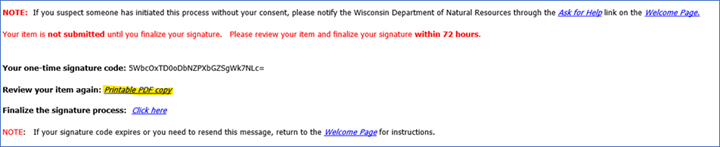
You can still download a copy for yourself to save and print. After you click "Sign and Submit," you will get a confirmation email from the ePermitting system. It will have a link inside for you to open the PDF file. It should open in your browser and should not have the “please wait” issue. Here is a screenshot of where the link is located in the email (yellow highlight):
What if I did not conduct any treatments under my NR107 permit?
Please submit the form using the instructions in the above question. There will be a button to select
No Treatment
and you can skip the rest of the form questions and go straight to the signature process.I didn’t use an herbicide product, how do I get past the required fields for name, amount and concentration rate?
The name and amount of any product used for pesticidal purposes (e.g., herbicide, algaecide, etc.) must be reported. If the product is not listed in the dropdown menu, the
other
box can be used to fill in the name(s). Although the box is labeledOther Herbicide,
it may also be used to enter products such as algaecides, dyes, etc. You can enterNA
for the concentration rate if that does not apply to your product.What is the process for reporting mechanical/manual control under my NR109 permit?
Your permit cover letter should outline reporting requirements for your NR109 permit.
Please submit the form using the ePermitting system.
Select “Mechanical/Manual Control Reporting Form” from the activity dropdown. The full instructions are included in the APM ePermitting Guidebook.
You can still download a copy for yourself to save and print, and you can use that copy to send to your DNR contact. After you click
Sign and Submit,
you will get a confirmation email from the ePermitting system. It will have a link inside for you to open the PDF. It should open in your browser and should not have theplease wait
issue. Here is a screenshot of where the link is located in the email (yellow highlight):
What if I did not conduct any control work under my NR109 permit?
Please submit the form using the instructions in the above question. There will be a button to select
No Control Completed
and you can skip the rest of the form questions and go straight to the signature process.If there are multiple waterbodies under one permit, do I need to do a separate TR for each one?
No. You can enter the 3 waterbodies on the same treatment record form provided the control occurred on the same date. You can use the
Add Site
button to add another site and use theSite No
box to differentiate the ponds (e.g., Pond 1, Pond 2, Pond 3).
ePermitting System - Troubleshooting
What is a MyWisconsin ID account and how can I get help with logging in?
You will need to use your MyWisconsin ID username and password to log in to our APM ePermitting site.
If you do not have a MyWisconsin ID account, please go to the MyWisconsin ID site and then click Sign Up next to the text “Don’t have an account?”
Full walk-through instructions for registering (including screenshots) are available in the ePermitting Frequently Asked Questions (FAQ) page.
If you forgot your MyWisconsin ID password, please follow the instructions available in the Division of Enterprise Technology page.
APM Staff do not have access to the MyWisconsin ID system to reset passwords.
If you have other account related issues or your account recovery does not work, you will need to contact MyWisconsin ID help staff directly at 608-471-6667 (MyWisconsin ID is not managed by DNR Staff). Additional FAQs about MyWisconsin ID are posted on the Division of Enterprise Technology page.
I paid my permit application fee and got a payment confirmation email, but my application is showing up in
Step 1: Draft Items
on my Dashboard. How can I fix this?That means the payment and signature process were not fully completed, so your application has not made it through to intake yet and is still showing up as a draft. Here’s what you need to do to finish it up:
- Log back in to the ePermitting site using your MyWisconsin ID.
- Under "Step 1 Draft Items," you should see your application under its draft name. The format is like “AIXXXX-ExampleName.” Click on that name.
- Go to the Payment tab and enter your confirmation number that you received in a system-generated payment confirmation email. The format is like
WS2WTXXXXXXXXXX.
- Click
Sign and Submit.
- Follow the on-screen prompts and check the email address associated with your MyWisconsin ID account.
- You will need to click the link in the email you receive in order to complete the second step of the two-step signature process.
- Check your email again for another confirmation email from the ePermitting system (different from the payment confirmation email) to let you know when it was submitted successfully.
My application is showing up in
Step 2: Signature Confirmation Needed
on my Dashboard. How can I fix this?Since signing the permit is a two-step process for security purposes, you will need to check the email associated with your MyWisconsin ID account. There should be a system-generated email that was sent to you when you first started the signature process with the subject
Action Required.
Click the link in the email to finalize the signature process, which will take you back into the ePermitting system for the final step.If that link is expired or does not work, you will need to resend the signature email and finalize the signature. Here are the steps:
- Log back in to the ePermitting site using your MyWisconsin ID.
- On the Welcome Page under
Step 2: Signature Confirmation Needed,
you should see your application under its draft name. The format is likeAIXXXX-ExampleName.
Look for theConfirmation Sent To
column and click on your email address. - The system will open a confirmation screen. You must select
Continue
to proceed to resend the signature confirmation email to yourself. - Check your email and look for a system-generated email with the subject
ACTION REQUIRED – Complete the Submittal Process.
Make sure to check your junk/spam if it does not show up in your inbox. - Open the email and click the link next to
Finalize the Signature Process – click here.
- This will take you back into the ePermitting system where you will then click
Confirm
a final time to complete the two-step process.
The payment process did not work correctly and did not go through. How can I try it again?
- Log back in to the ePermitting site using your MyWisconsin ID.
- Under
Step 1 Draft Items,
you should see your application under its draft name. The format is likeAIXXXX-ExampleName.
Click on that name. - Go to the Payment tab.
- Click the
No Confirmation Number?
link to the right of the Confirmation Number box. You may also have to toggle theHide Help/Show Help
to get additional text to display in orange shading. - In the expanded orange-shaded section that opens up, click the
Complete Payment
gray button. This should take you to the US Bank payment page. You will need to follow the instructions to pay and get the confirmation number. - When the payment process is complete, go to the Signature Tab and complete the signature process. The system will send an email to the address associated with your MyWisconsin ID account that you will need to click on to complete the two-step process.
Permit Issuance (Timeline, Holds, Etc.)
How long does it take to receive a decision about my permit application?
Decisions are made within 10-15 business days of receiving a complete and acceptable permit application.
How can I get a status update on my permit application?
After 3-5 business days of submitting your application, it will be visible on the ePermitting system’s public search feature. You can check the status yourself by searching the waterbody or project name.
If it shows up in the system as Pending, that means it is in the Review queue. A decision will be made within 10-15 business days of receiving a complete and acceptable permit application.
Permits that are not private ponds are reviewed and issued by regional APM Staff according to the county in which the waterbody resides. Please use the APM Coordinator map on the APM page to find the appropriate staff member to contact if you have further questions about a non-private permit application.
Private pond permits are reviewed and issued by Central Office APM Staff. If it has been longer than 15 business days, you may reach out to DNRAPMProgram@wisconsin.gov to ask why your application still appears as Pending.
It has been 3-5 business days, so why does my application not show up on the public search?
If it does not show up on the ePermitting system's public search page (and it has been 3-5 business days of submittal) please check the email associated with your MyWisconsin ID account. You should have received a system-generated email from dnrepermit@wisconsin.gov with the subject “A permit application has been signed and submitted to the WI Dept of Natural Resources.” You may need to check Junk/Spam.
If you found the confirmation email, you may email DNRAPMProgram@wisconsin.gov to ask about your application’s status. Please provide the reference number (format similar to "AP-IP-XX-XXXX-XX-XXX-XXXXX-XX-XX").
If you did not get an email like this, please log onto the ePermitting system's main page. Check to make sure your application was fully submitted and is not still in your
Step 1 Drafts
or Step 2 Incomplete Signature sections. Review the troubleshooting questions for more details.Can you expedite my permit application?
We must process permit applications in the order they are received. We make our best effort to get applications processed as soon as possible, but we cannot push yours ahead of others that are also waiting in the queue. Thank you for your understanding.
What is the intake
hold
process and how does it affect my permit application?Your permit application is initially screened by central intake APM staff for completeness and correctness. If you submitted your application with incorrect, missing, or unclear information, DNRAPMProgram@wisconsin.gov will send you an email to request the information. After you send the correct information to central intake, the 10-15 day permit review timeline will restart.
I received a hold email – how can I go back into the system and make my edits?
Users cannot edit their own permit applications after they’ve been submitted. DNR Intake Staff will have to manually make edits on your behalf. As stated in the hold email instructions: please respond directly to that email with the missing items/information.
Permit Files
My permit application is not on the public search yet. How can I get a copy of what I submitted?
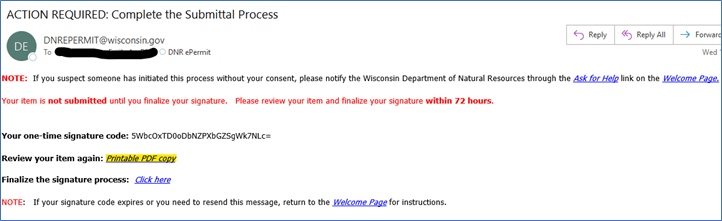
The person who submitted the permit application can download a copy of the PDF they submitted using the link provided in the first system-generated signature confirmation email with the subject
Action Required: Complete the Submittal Process.
The link is in the body of the email and is titledPrintable PDF Copy.
Below is a screenshot example of how the email and the PDF link (highlighted in yellow) will appear:
How can I get a copy of my approved permit?
Permit files are accessible at any time without needing a login from the ePermitting public search site. You can search by your permit/waterbody name, permit number or applicant name, or you can use the filters on the left side to find the correct document set.
Permit Changes and Waterbody Status Changes
How can I add acreage to my existing non-private permit application?
You will need to submit a new permit application in order to pay the additional fees and provide the new acreage information, new maps, updated riparian owner’s list, etc.
I have a private pond permit for a waterbody that no longer fits the definition of a private pond. Can I still treat this pond under my existing permit?
No. Please submit a non-private permit application for this waterbody. There are different requirements for non-private waterbodies (e.g., public notice, different fees, additional form questions, etc.) that cannot be met under your existing private pond permit.
We are taking over as applicators for an existing private pond permitted to another company. Can we add our information to the existing permit?
No. Please submit a new permit application with your own company’s information. We need a written record from the pond owner that they are changing companies and want to withdraw the other permit. If you include a copy of such correspondence from them in the attachments, that will help speed up processing. Otherwise, please provide their email address in the pond owner section (hidden from public view) and we will reach out to them directly.
Permit Refunds
Can we get a refund for our chemical permit?
NR107 non-private permittees are eligible for a refund of their acreage fee if their permit was not approved, if they withdraw before a decision is made, or if they did not conduct any control under their permit. No refunds are allowed for partial treatments. If the permit is issued with the proposed treatment area partially denied, we can give a refund of acreage fees for the area denied.
Private pond permit fees are non-refundable under NR 107.11(3)(b).
For a refund request, please send an email to DNRAPMProgram@wisconsin.gov with the following information:
- Permit Name
- Permit Number for approved permits (e.g., NE-2024-01-1234) or Application Reference Number for unapproved/withdrawn permits (e.g., AP-IP-NE-2024-01-X01-01T-02-03-04)
- Amount to be refunded (acreage fee only)
- Reason for refund
- If reason for refund is
No Treatment
occurred, confirmation that a treatment record statingNo Treatment
has been submitted to the ePermitting system. - Confirmation the funds can be returned to the account/card they were drawn from when the permit fee was paid.
Can we get a refund for our mechanical permit?
No, you cannot. NR109 permit fees are non-refundable under NR 109.04(2)(a).