
GameReg - electronic game registration
All deer, bear, turkey, sharp-tailed grouse, bobcat, fisher and otter harvests must be reported electronically through GameReg.
Registration methods
Registration is still mandatory and is accomplished using one of the methods below:
- Online: Via gowild.wi.gov (fastest and easiest method); log into your account with your username and password to access your harvest authorization or tags.
- Online: Via gamereg.wi.gov; provide your unique harvest authorization or tag number to begin the registration process.
- Phone: Call 1-844-GAME-REG (1-844-426-3734); a list of county codes can be found on the website.
- In person: At an in-person deer registration location that provides a phone or computer to the public.
Reminder: You will need your unique tag number or harvest authorization number to begin the registration process.
How it works
Upon submitting all required harvest information through GameReg, the hunter will receive a 10-character confirmation number for his/her records. This confirmation number no longer needs to be written on the tag or harvest authorization, but should be retained and may be required if the game is taken to a taxidermist or meat processor. All hunters will obtain a confirmation number at the completion of registration, even if registering at an in-person station.
Exception: while bobcat, are reported through GameReg, they still require in-person registration within seven days of the end of the month of harvest. Otter and fisher no longer have in person registration.
Go Wild
Manage Your GameReg
Manage Your GameReg will take you to your Current Tags/Harvest Authorizations grid, allowing you to register a harvest on an unfilled tag or harvest authorization, auto-filling some information based on the type of tag/harvest authorization and location for which it is valid. After logging into Go Wild, go to the My GameReg section at the bottom of the page. You can click on any current tag/authorization listed, or click “Current tags/harvest authorizations” to access a complete list of your unfilled tags. You can then register a harvest directly on the selected tag/authorization. Tags/authorizations will be automatically removed from this list once all allowable registrations have been reported for a tag/authorization.
Harvest history
Harvest History lists all registered harvests on your Go Wild account. This section includes the tag/harvest authorization number and registration confirmation number for each harvest, allowing you to look up your confirmation number if taxidermists or meat processors require it for processing the harvested animal.
Car-killed deer and turkey registration
Car-killed deer and turkey can also now be registered online through GameReg. On gamereg.wi.gov, click on the car-killed deer and turkey link to get started. Car-killed deer and turkey can also be registered at 608-267-7691. Please note that car-killed bear must still be registered by phone at 608-267-7691. Learn more about taking possession of car-killed wildlife.
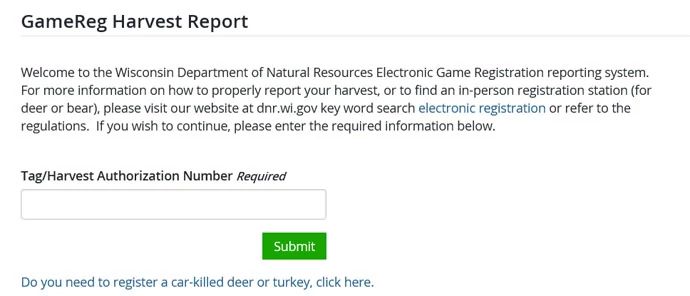
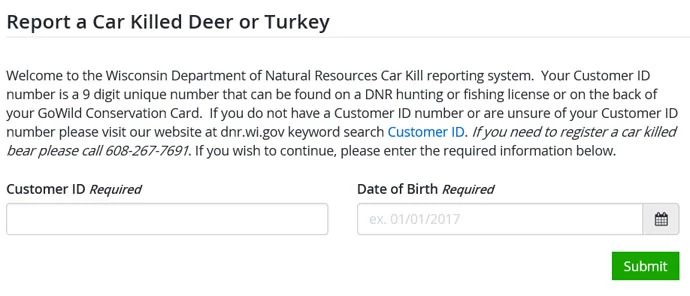
Some car-killed wildlife can now be registered online through GameReg. Click the car-killed deer or turkey link below the tag/harvest authorization number box to register a car-killed deer or turkey.
Contact information
For more information on harvest registration, contact: